
Effective Pricing Plans for WooCommerce Subscriptions
Pricing can be the make or break for a subscription business. If you price it too low you may get more subscribers but you’ll be left with very thin margins and will have little to spend on fulfillment, support, payment fees, marketing and product. If you price it too high you may see conversions drop unless the customer fully understands the value they’re going to get.
Effective subscription pricing is all about tying together three things: the value you’re offering the customer, the cost of delivering that value and the billing structure that the customer can easily understand. WooCommerce deals with products, checkout, payments and orders, but it doesn’t have a built-in recurring billing solution. You’ll need a dedicated subscription plugin to enable subscription functionality. The right plugin will allow you to offer monthly, annual, fixed term, trial and tiered plans and will also allow you to manage the renewal process through WooCommerce.
This guide walks you through how to work out a sustainable price, how to select a pricing model, how to build useful plan tiers, how to set up monthly and annual options and how to use trials, signup fees and discounts appropriately. It also covers how to configure your pricing plans in WooCommerce and how to improve them using real subscription data.
Creating and Managing Subscription Plans in WooCommerce
WooCommerce provides the base for online product sales (product management, cart, checkout, payments and orders) but doesn’t include a full blown recurring subscription system on its own. You’ll need a subscription plugin to create billing schedules, handle renewals, manage subscription status and allow the customer to manage their own plans.
WooCommerce subscription plugins have different features, different payment gateway integrations, different renewal options and different customer management tools. Before you pick one, make sure it supports the billing intervals, the trials, the signup fees, the plan changes, the payment methods, the cancellation rules, the member benefits and the self service options that your business needs.
For the configuration examples in this guide we’re using ArraySubs. It brings recurring products, flexible billing terms, renewal records, plan switching, member access and customer portal tools into the WooCommerce workflow. Other subscription plugins will likely have different settings, different menus and different terminology, but the pricing principles outlined in this guide will still apply.
What Makes a Subscription Pricing Plan Effective?
An effective pricing plan is profitable for the business and easy for the customer to evaluate. It should answer five questions quickly:
- What does the customer receive?
- How much does it cost?
- How often will the customer be charged?
- What changes between the available plans?
- What happens when the customer upgrades, downgrades, pauses, or cancels?
The plan should also support the business’s economics. A digital resource library may have low fulfillment costs but require continuous content production. A subscription box has inventory, packing, shipping, damaged-item, and return costs. A service membership must account for staff time and delivery capacity. Two businesses charging the same monthly price can therefore have very different margins.
Start with a pricing hypothesis, not a permanent answer. Launch with terms you can explain, track what customers do, and improve the structure as evidence accumulates.
Choose the Right Subscription Pricing Model
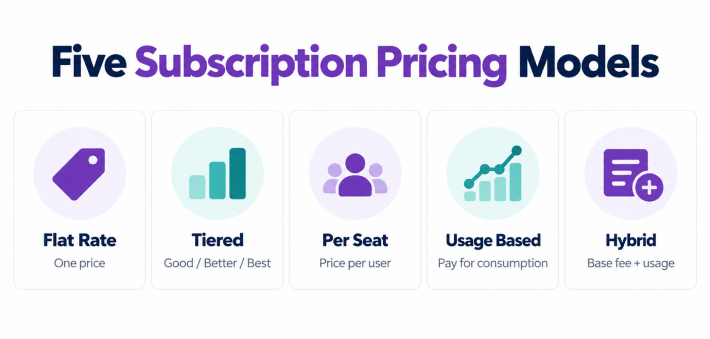
The pricing model describes what determines the recurring charge. Common models include:
Flat-rate pricing
The customer pays one recurring price for one defined package. That’s easy to explain and works very well for focused memberships, newsletters, maintenance plans and the like.
Tiered pricing
Customers can choose from a range of packages such as Starter, Growth and Premium. The higher the tier the more access, capacity, service and/or convenience you get. Tiered pricing is useful when you have customers with genuinely different needs and different willingness to pay.
Per-user or per-seat pricing
The charge goes up with the number of users. That’s the norm with team software, professional tools, education platforms and the like.
Usage-based pricing
The customer pays according to consumption (e.g. transactions, messages, storage, API calls, hours etc). Usage pricing is perfectly aligned to the actual activity of the customer, but it does require you to be able to measure it accurately and to have a very predictable customer experience.
Hybrid pricing
A base subscription comes with a defined allowance and anything above that incurs an extra charge. Hybrid plans can be used to protect minimum revenue whilst still allowing the larger customers to grow.
WooCommerce combined with a subscription plugin can handle a wide variety of recurring offers. More sophisticated metered billing however may require a bespoke integration. You need to pick a model that your store can actually calculate, show, invoice and support.
How to Create Pricing Plans for Your WooCommerce Subscription Business
Step 1: Calculate Your Minimum Sustainable Price
Do not begin by copying a competitor’s price. First calculate the amount required to serve one subscriber without losing money.
A practical contribution-margin calculation is:
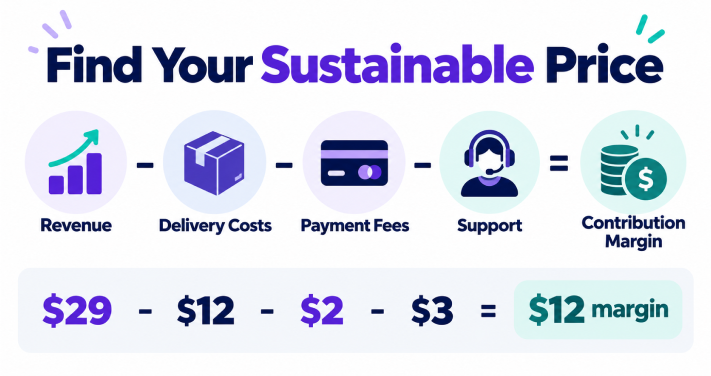
Contribution margin per billing cycle = subscription revenue – variable delivery and fulfillment costs – payment fees – incremental support costs – expected refunds or credits
For a physical subscription, include costs that change as each order is fulfilled, such as inventory, packaging, picking, postage, payment fees, and replacement allowances. For a digital membership, include only the incremental per-member portion of usage-based third-party services, content delivery, and customer support. Track your fixed or semi-variable costs (e.g. salaries, base software costs, scheduled content production) separately when looking at the overall profitability of the business.
Example:
- Product and packaging: $12
- Shipping subsidy: $5
- Payment and platform costs: $2
- Support and replacement allowance: $3
- Total variable cost: $22 per month
If it’s selling for $29 its contribution margin is $7 before you get to the fixed expenses, marketing, salaries and profit. That may be a bit too narrow if your acquisition costs are high or if people are cancelling quite quickly.
Also work out the customer acquisition cost and the number of billing cycles it will take to recover that.
If acquiring a customer costs $60 and the plan contributes $20 per month, the basic payback period is three months. A plan with average retention below that point needs a lower acquisition cost, a higher price, a better margin, or stronger retention.
Step 2: Choose a Value Metric
A value metric is the unit that goes up as the customer gets more value. Examples would be members, users, projects, storage, deliveries, support hours, products, access level etc.
A strong value metric should be:
- Easy for customers to understand
- Closely connected to the benefit they receive
- Simple for the store to measure and enforce
- Able to grow as customer needs grow
Don’t charge for a metric that the customer will perceive as arbitrary. One community might price on access level, another on seats or usage. A product box that’s been curated might be priced on box size and frequency of delivery.
Step 3: Decide How Many Plans to Offer
More plans don’t necessarily lead to more revenue. Having too many plans can in fact inhibit the decision process, make access rules more complicated and generate more support work.
Use one plan when:
- The audience has one clear need
- The deliverable is essentially the same for everyone
- The business is validating its first subscription offer
- Operational simplicity matters more than segmentation
Use two or three plans when:
- Customers have visibly different needs
- Higher tiers contain benefits with real added value
- The business can explain the difference in one sentence
- Upgrades provide a natural expansion path
Three tiers are the norm as they can cater to the entry level, the growing market and the high value customer. The point is though that each tier has to have a distinct purpose. You can’t just remove one little constraint and say “that’s good enough to warrant a separate plan”.
Step 4: Create Useful Plan Tiers
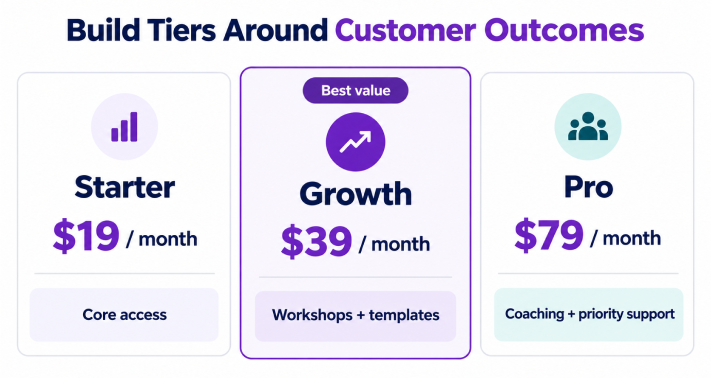
Build tiers around customer outcomes rather than a random list of features. Here is a simple example for a learning membership:
Starter – $19 per month
- Core lesson library
- Monthly resource pack
- Community access
Growth – $39 per month
- Everything in Starter
- Weekly workshops
- Premium templates
- Priority community support
Pro – $79 per month
- Everything in Growth
- One group coaching session
- Advanced resource library
- Priority support and feedback
The middle plan should usually represent the offer most suitable for the target customer. Highlight it because it provides the strongest balance of benefits and price, not merely because you want to sell it.
Check the cost of every premium benefit. Live support, consulting, custom reviews, and physical deliveries can make a high tier expensive to serve even when its price looks attractive.
Step 5: Set Monthly and Annual Prices
Monthly billing reduces the customer’s initial commitment and makes the offer far easier to try. Annual billing gives the customer the cash earlier and can in turn reduce voluntary churn driven by monthly cancellations.
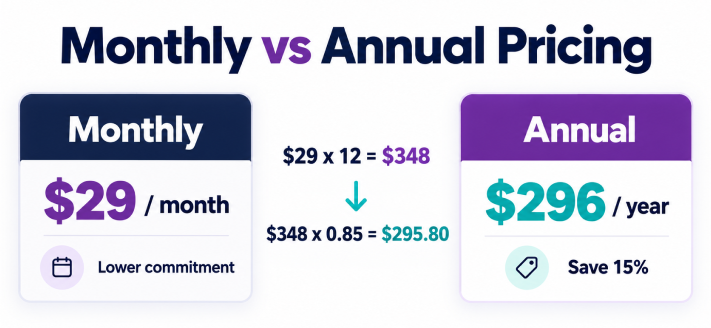
Calculate the undiscounted annual value first:
Annual value = monthly price × 12
If a plan costs $29 per month, the annual value is $348. With a 15% annual commitment discount:
Annual price = $348 × 0.85 = $295.80
You could put it at $296 per year (equating to around $24.67 per month). State the actual annual price. Don’t say “two months free” unless the annual price actually delivers that.
The discount should reward commitment without damaging margin. Compare:
- Expected retention under monthly billing
- Refund and cancellation policy
- Cash-flow value of annual prepayment
- Fulfillment costs across the full year
- Support burden of long-term commitments
For physical subscriptions, do not offer an aggressive annual discount until you have confirmed that product and shipping costs will remain manageable.
Step 6: Use Trials, Signup Fees, and Introductory Pricing Carefully
Free trials
A trial works when customers need time to experience the value before paying. It is less useful when the business delivers most of the value immediately or incurs a large upfront cost.
Decide whether a payment method is required, how long the trial lasts, whether each customer may use it once, what access is included, and which email explains the first charge.
Signup fees
A one-time signup fee can cover onboarding, setup, a welcome kit, account configuration, or other initial work. Explain the fee separately from the recurring price. Do not use an unexplained fee simply to make the subscription appear cheaper.
Introductory pricing
An introductory price reduces the initial barrier and then reversts to the normal renewal amount. Display both prices, the number of discounted cycles, and the exact date or event that changes the price.
For example:
- $19 per month for the first three payments
- $29 per month from the fourth payment onward
This is clearer than promoting a low price while hiding the later renewal amount.
Step 7: Configure Pricing Plans in WooCommerce with ArraySubs
Once the pricing structure is defined it can be implemented in WooCommerce. Using the ArraySubs workflow described above the next steps are to turn the pricing decisions into subscription products, recurring terms, customer self service, plan switching rules and renewal records.
Maintenance note: These instructions have been checked against ArraySubs 2.0.9 on 27th October 2026. The interface could well change in later versions.
Create a simple subscription product
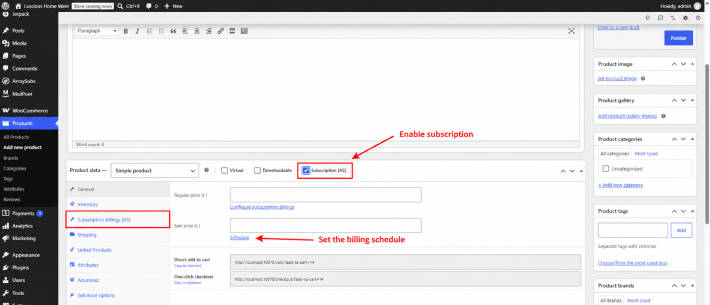
Go to Products -> Add New. Enter the plan name, description, benefits, product image and regular price. In Product data select Simple product and enable Subscription [AS]. The Subscription Billings [AS] tab will then be available.
Configure the billing terms
Set the billing period, billing interval, subscription length, trial length, trial period and signup fee. The WooCommerce regular price becomes the recurring amount for new subscriptions.
Use a subscription length of zero for an ongoing plan that renews until cancelled. A fixed number of cycles is useful for an instalment style programme, seasonal access or a membership with a fixed term.
Create monthly and annual variations
If the customer chooses Monthly or Annual on a product page then use a variable product with an attribute such as Billing plan. Create one variation for each option and set the price, period, interval, trial, fee and subscription length for each variation individually.
Price changes will generally apply to new buyers. Existing subscriptions will retain the price at the time of purchase. You’ll need to plan a migration or switch process so that existing customers can move to the new terms.
Use a different renewal price when appropriate
ArraySubs Pro can apply a different recurring amount after a specified number of completed payments. This enables transparent introductory pricing e.g. $19 for 3 payments then $29 per month.
Before you use it, just make sure that the product page, the cart, the checkout, the emails and the customer portal all reflect the full schedule.
Step 8: Configure Store-Wide Plan Rules
Open Array Subs → Settings → General and choose how the pricing plans can be combined.
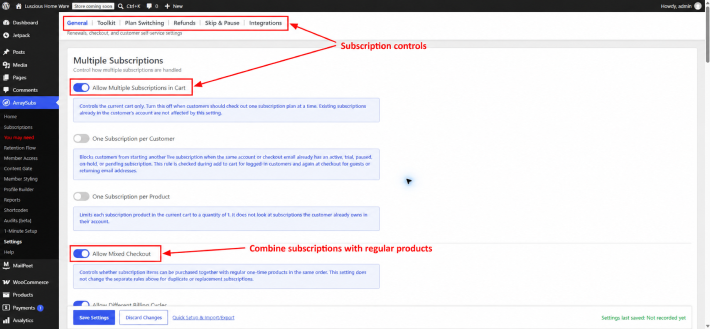
Review:
- Multiple subscriptions in one cart
- One active subscription per customer
- One subscription per product
- Mixed checkout with subscription and regular products
- Different billing cycles in the same order
These settings have an impact on both customer choice and the level of operational complexity. If the business is expecting one membership per person then you’ll want to prevent duplicate purchases. If customers are able to combine a membership with products then you’ll need to test mixed carts, discounts, taxes, shipping and refunds.
Step 9: Plan Upgrades, Downgrades, and Proration
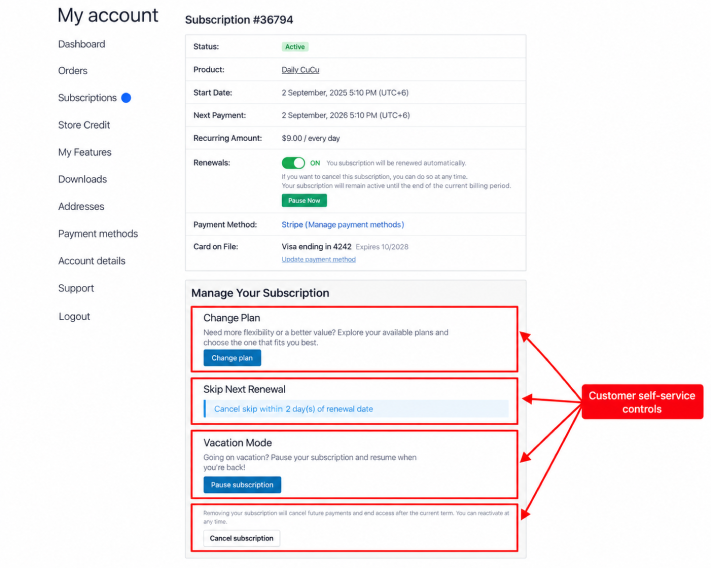
Tiered pricing works better when people can move between plans. You need to define which of your products or product variations are valid upgrade, downgrade or crossgrade targets.
Then choose how the price difference is handled:
- Prorate straight away: credit the old plan for the value not used and charge the difference going forward.
- Apply at renewal: stay on the current plan until the next renewal and price it after payment.
- No proration, charge the full new plan price immediately.
Immediate proration may seem fair but it creates a whole lot of calculations, invoices, refunds and rounding. Applying the change at renewal is much easier to explain, but of course you don’t get access to the new plan until renewal unless you go and give it to you earlier.
Show the effective date, credit, new charge and next recurring amount prior to the customer confirming the switch.
Step 10: Use Discounts Without Weakening the Offer
Discounts should support a specific business goal. Common uses include:
- Annual commitment discounts
- Short introductory offers
- Win-back or retention offers
- Partner or employee programs
- Limited coupons with a defined renewal-cycle limit
Don’t go in for site wide permanent discounts that teach the customer to just wait for a discount. Test whether the coupon only affects the first payment or whether it carries over to the renewal.
Member discounts are distinct from the discount on the subscription itself. A membership may provide you with lower prices or free shipping on other WooCommerce products. You need to include the cost of those benefits when working out the price of the membership.
Step 11: Account for Taxes, Shipping, and Payment Costs
The plan price shown is not the only figure that will impact profitability or customer expectation.
Taxes
Confirm that prices are inclusive or exclusive of tax and how recurring orders are calculated in each selling region. The product page, cart, checkout, invoices and renewal emails all need to be the same.
Shipping
For physical subscriptions decide whether shipping is charged at checkout, on each renewal, is included in the plan price or is discounted for members. Work out the impact of destination, package weight, carrier increases and failed delivery.
Payment processing
Percentage fees have an impact on every renewal, whereas the fixed transaction fees have a much bigger impact on the lower priced plans. The automatic and manual renewal processes also lead to very different customer experiences and very different levels of recovery work.
Refunds and credits
Define how refunds, partial periods, plan switches and account credits impact revenue. Document the policy prior to advertising long term commitments.
Step 12: Test the Pricing Experience Before Launch
Use a test customer and complete every important path:
- Purchase each plan and billing interval
- Confirm the first payment, fee, tax, and shipping amount
- Check the recurring amount and next payment date
- Verify trial conversion and introductory-price changes
- Apply valid and invalid coupons
- Upgrade and downgrade between plans
- Test proration and renewal-date behavior
- Confirm access for each tier
- Review customer and admin emails
- Trigger a failed payment and recovery path
- Cancel and reactivate according to policy
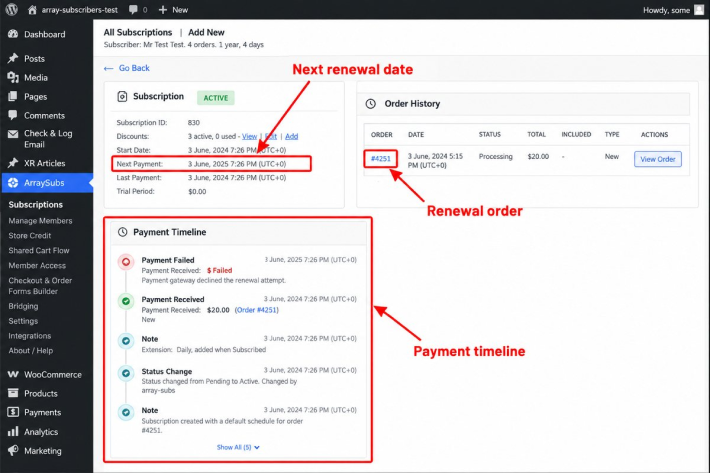
Testing protects the customer’s promise. A pricing page can look correct while the renewal invoice, access rule, tax calculation, or gateway behavior is wrong.
Step 13: Measure and Improve Pricing After Launch
Track more than total revenue. Useful subscription-pricing metrics include:
- Conversion rate by plan and billing interval
- Monthly recurring revenue
- Average recurring revenue per subscriber
- Gross and contribution margin
- Trial-to-paid conversion
- Monthly and annual retention
- Voluntary and involuntary churn
- Upgrade and downgrade rates
- Discount usage
- Failed-payment recovery rate
- Refund rate
- Customer acquisition cost and payback period
Review cohorts rather than just mixing all your customers together. The customers who joined via a deep discount are likely to behave very differently to the full price customers. Monthly and annual customers may also have very different conversion and retention characteristics.
When you’re testing a price you need to change just one big variable at a time. If you change the amount, the benefits, the trial, the sales page and the audience all at the same time then you won’t know what actually caused the result.
Common Subscription Pricing Mistakes
Copying competitors without understanding costs
A competitor might have quite different margins, different levels of funding, different customer acquisition channels and quite different product scope. Use competitor prices as a guide to the market, not as your cost model.
Creating too many tiers
Every additional tier adds more product configuration, more access rules, more switching logic, more support explanations and more testing.
Hiding renewal terms
Show the recurring amount, billing interval, trial, signup fee, future renewal price and cancellation terms prior to purchase.
Discounting before proving value
A discount won’t fix an unclear product. Improve the offer and the explanation first before you reduce the price.
Ignoring existing subscribers during a price change
Decide whether existing customers stay on their current price, get advance notice or go through a defined plan switching process.
Treating annual revenue as immediately earned profit
Annual prepayments improve cash flow, the business still has service/fulfilment to deliver for the balance of the term.
Failing to test the full renewal lifecycle
The first checkout is just one event. Pricing must be correct through renewal, failure, recovery, switch, pause, cancellation, refund and expiry.
Conclusion
Poor subscription pricing can very quickly result in thin margins, confusion for the customer and higher churn. If you don’t account for delivery costs, have too many plans or obscure your renewal terms then even a great subscription can be a very difficult thing to sell and manage.
A good pricing strategy begins with a clear understanding of customer value and the real cost of serving each individual subscriber. You need to pick a value metric, offer only relevant tiers and then make every price point, every billing period and every renewal condition as simple as possible.
Once you’ve got your strategy in place, both WooCommerce and ArraySubs can help you turn that into recurring products with monthly/annual billing, trials, signup fees, flexible plans, ability to switch, discounts and customer self service. You can test the full subscription journey prior to launch and then use your conversion, margin, retention and churn data to refine your plans over time.
Related Articles:
- 5 WordPress Preloader plugins to Visually Appeal Your Website Visitors
- Selecting the Out of Box Pricing Table for a WordPress Website
- 7 Best WooCommerce Reporting Plugins in 2026
FAQs
How many WooCommerce subscription plans should I be offering?
Start with one plan when the audience and benefits are simple. Use two or three plans when the customer has clearly different needs and each plan delivers a different, meaningful outcome.
Should I offer monthly and annual billing?
Offer both where the business can afford to commit and where the annual option is clearly advantageous. Monthly reduces the barrier to entry and annual billing gives you the cash flow earlier and can in effect remove the need for the customer to make the decision to cancel all the time.
How large should an annual discount be?
There is no universal percentage. Calculate the value of commitment, retention, cash flow, fulfillment costs, refunds, and margin. Common market practices are only a reference point.
Should I provide a free trial?
Use a trial when you need the customer to experience the ongoing value over time and the cost of serving trial users is acceptable. You need to specify whether a payment method is required and what happens when the trial expires.
When should I charge a signup fee?
Charge one where there is a real up front cost (e.g. onboarding, account setup, customisation, physical welcome kit etc). Need to explain that separately from the recurring charge.
Can I change the subscription price later?
You can change the WooCommerce product price for new purchases. Existing ArraySubs subscriptions will retain their recorded purchase time price so if you’re looking to move existing customers you’ll need to go through a migration or plan change process.
How should upgrades and downgrades be charged?
Choose immediate proration, a change at the next renewal or a full immediate charge. The right option is going to be dependent on when access changes and how easy it is for the customer to work out the calculation.
Which metric matters most when evaluating subscription pricing?
No one metric in the lot is going to be enough. You need to look at conversion, contribution margin, retention, churn, ARRE, acquisition cost and payback.
Leave a Reply
You must be logged in to post a comment.