
How To Price Your WordPress Membership Site: Free, Monthly, Annual or Lifetime?
Pricing shapes the rest of a membership site: who joins, how long they stay, and how much is left once the bills are paid. This guide covers the main choices (free, monthly, annual and lifetime), then shows how to turn them into a clear pricing page and a working setup in WordPress with ARPrice and ARMember.
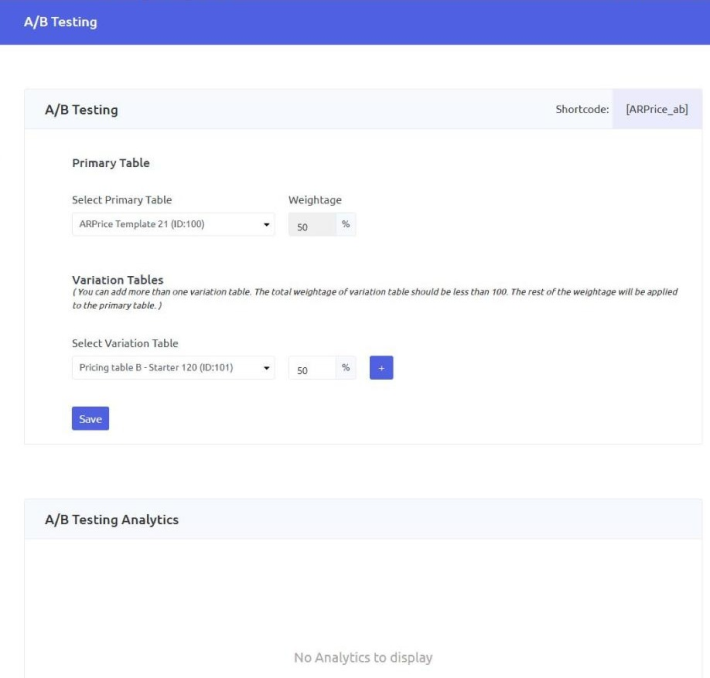
To write this guide, I built a test site with ARMember and ARPrice and set up three plans (monthly, annual and lifetime) to see how the pieces fit together. Two details are worth knowing before you start. In ARPrice, each side of the monthly/yearly toggle holds its own content, so the monthly tab starts empty until you copy the yearly one and change the prices. And the A/B testing page only appears after you switch it on in the plugin settings.
Quick Answer
Start from your costs and from the value members receive. Offer a monthly plan for an easy entry and an annual plan at a discount for stability. Add a lifetime option only if you can support it for years. Test your prices before you lock them in.
Match Your Price To The Value And The Length Of Access
A price tells visitors what kind of result to expect. A short training that solves one problem can sit at a modest price. A community with live support and new content every month justifies a higher one.
Two questions come first: what result does a member get, and how long do they need access to get it? If the result arrives in a few weeks, short or one-time access fits. If the value builds over time, as with a community or ongoing support, recurring billing fits.
Also think about your own workload. Every member adds support requests, content to maintain and payments to manage. Pick a model you can run without burning out.
Monthly, Annual or One-Time: What Each Billing Model Does
- Monthly lowers the barrier to entry, but leaving is easy too. You need a steady flow of useful content.
- Annual brings the money in upfront and gives members time to see results. The higher price makes some visitors hesitate.
- One-time removes subscription fatigue. You get cash now, but no recurring income.
- Hybrid offers monthly and annual side by side, so visitors choose the commitment they are comfortable with.
| Billing model | Best for | Main advantage | Main risk |
|---|---|---|---|
| Monthly | Low-friction entry | Easy to say yes | Members can leave quickly |
| Annual | Serious learners | Predictable cash flow | Higher upfront price |
| One-time | Content that does not change | No billing fatigue | No recurring revenue |
| Hybrid | Mixed audiences | Flexibility for visitors | More plans to manage |
To build an annual price, multiply the monthly price by twelve and apply a discount you can afford. For example (illustrative numbers only), a $20 monthly plan could become a $200 annual plan, which is two months free.
Lifetime access needs extra care. You are paid once but may support that member for years, so estimate what a member costs you each year and decide how long the promise lasts. A common way to limit the risk is to cap these offers by time or by number of spots. ARMember itself sells both models: at the time of writing, its official pricing page lists annual plans and lifetime plans, with the lifetime ones including lifetime updates and three years of premium support.
Payment gateways also charge their own fees on every transaction. Small monthly payments multiply those costs, so check your provider’s fee structure.
Free Access And Free Trials Solve Different Problems
A permanent free tier builds an audience and an email list. The risk is that free members use your resources without paying, so the line between free and paid must be clear.
A free trial gives full access for a limited time and reduces the fear of buying. Base its length on the moment your content clicks for a new member. Too long, and they consume everything and leave. Too short, and they never see the value.
Ask what free members get, what only paid members reach, and what will push someone to upgrade. If almost nobody upgrades, the free tier may be too generous. For a deeper look at how access areas work, this guide to member areas in WordPress covers the options.
Tiers Should Map To Clear Differences In Access
Two or three tiers are usually enough. Each one should differ in something members can see:
- depth of content, such as basic lessons versus advanced tutorials
- access to support, such as a public forum versus priority replies
- downloadable resources and templates
- access to a private community or live Q&A sessions
Keep your most time-consuming benefit, such as direct coaching, for the top tier. Name tiers by who they are for (“For freelancers”, “For agencies”) rather than by medals, and make the middle tier the best fit for most of your audience.
Set Your First Price From Your Costs, Then From Member Value
Step 1: find your floor. Add up your monthly costs: hosting, plugin licenses, payment fees, email tools, content production and support time.
Step 2: add your target profit. Decide what you want left after costs. Your time counts as a cost too.
Step 3: divide. For example (illustrative numbers only), with $400 of monthly costs and $200 of target profit, you need $600 a month. At $20 per member that is 30 members. At $15 it is 40.
Step 4: check the value. Write the promised result in one sentence. If you cannot, the price will be hard to defend.
Step 5: look at the market without copying it. Use competitors as a range, not as an answer, because their costs and goals differ from yours.
Step 6: pick a starting price and a review date.
Show Your Plans Clearly With ARPrice
Once you know your plans, visitors need to understand them in seconds. A pricing table puts the plans side by side. ARPrice is a WordPress pricing table plugin with a real-time editor and ready-made templates. Features that match the decisions above:
- a price toggle (premium) to switch between monthly and yearly offers on the same table
- ribbons such as “Best deal” to mark the plan you recommend
- tooltips to explain a feature without cluttering the table
- built-in analytics (premium) showing views and button clicks per table
According to the ARPrice website, the premium version is listed at $27 at the time of writing, and a free version is available.
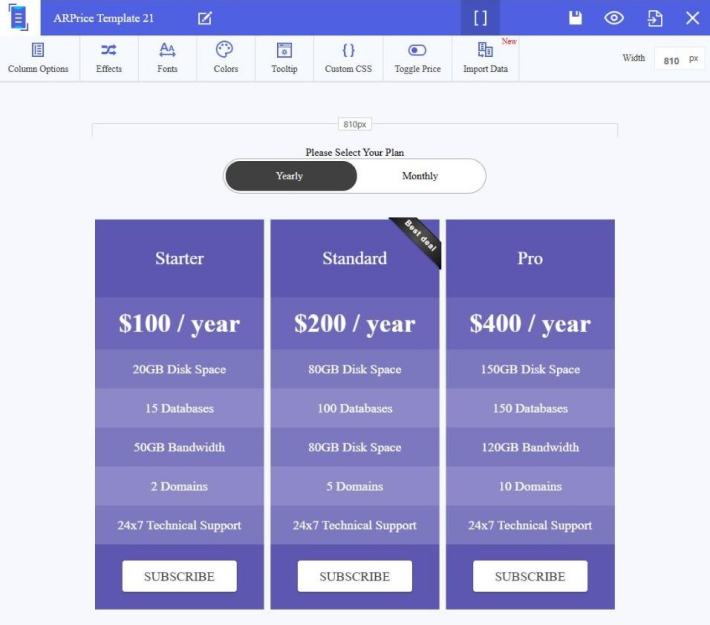
Three habits improve any pricing page: mark the recommended plan, show the annual saving in plain numbers (for example “two months free”), and use specific button text such as “Start monthly” or “Choose annual”.
Run Your Plans In WordPress With ARMember
A pricing table explains your offers. A membership plugin delivers them. ARMember creates the plans, restricts content, accepts payments and manages renewals. According to its official pages, it supports unlimited membership plans (including recurring ones), content restriction, member self-service (upgrade, downgrade, renew, cancel), prorated plan changes, drip content, coupons and a large list of payment gateways in the paid versions. A free Lite version lets you test your structure first.
ARPrice and ARMember work together: the ARPrice documentation explains how to open ARMember’s plan and sign-up form in a pop-up from a table button, so a visitor can choose a plan and register in one flow.
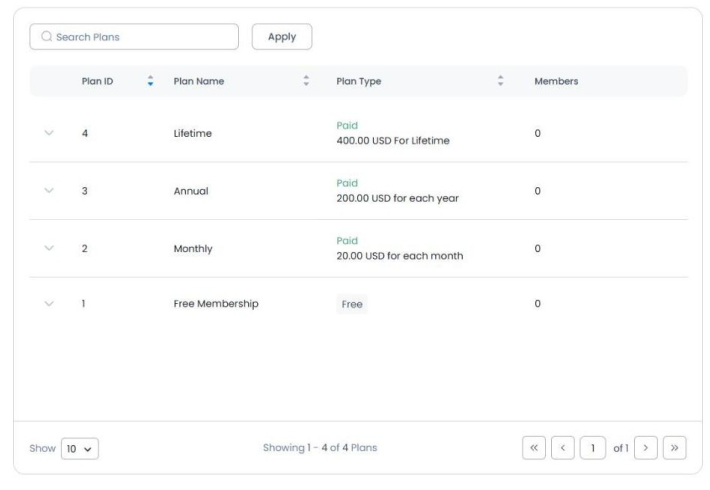
ARMember’s own pricing page shows the logic of this guide, with annual and lifetime options (promotional prices at the time of writing, so check the page):
| ARMember plan | Annual | Lifetime | Sites |
|---|---|---|---|
| Standard | $89 per year | $229 | 1 |
| Professional | $139 per year | $379 | 2 |
| Enterprise | $299 per year | $599 | 10 |
For an independent walkthrough of the plugin, see my ARMember review.
Count The Real Cost Before You Fix The Price
The license is only the visible part. Add payment fees, hosting, setup and maintenance, and your own time to the floor from the pricing step. If you hire a developer, one source, WP-Tonic (December 2025), puts a basic membership site redesign at $3,000 to $10,000 and complex platforms at $5,000 to $30,000 or more.
Test a Price Before You Commit To It
A first price is a hypothesis.
A founding member offer. Offer a lower price to your first members in exchange for feedback, and tell them their rate stays the same as long as they remain subscribed.
A/B testing. In the premium version, ARPrice lets you choose a primary table and one or more variations, then give each a share of impressions. One shortcode shows them to visitors, and the analytics show views and clicks per table. You could compare a $19 plan with a $29 plan. Clicks are not purchases, so compare them with your real sign-ups. Saving the test settings resets the analytics.
A regular review. Check sign-ups, cancellations and upgrades every few months. If you raise prices later, warn members in advance and consider keeping existing members at their current rate.
Related articles:
- Selecting the Out of Box Pricing Table for a WordPress Website
- 10+ Best WooCommerce Plugins to Build a Subscription Business (Complete Stack)
- Enticing Ways you can Price Products or Services On Your Pricing Tables
FAQ
How much does ARMember cost?
ARMember has a free Lite version. Paid annual plans start at $89 per year for one site, and lifetime plans start at $229, according to its official pricing page at the time of writing.
How much does ARPrice cost?
ARPrice has a free version, and its website lists the premium version at $27 at the time of writing. Check the official page before buying.
What is the best subscription model for a new business?
A simple monthly plan with an annual option is a safe start. Add tiers or a lifetime offer later, once you know what members use and value.
How do I know if my pricing is right?
Compare your price to your costs and to the result you deliver, then watch sign-ups, cancellations and upgrades. If many people click but few buy, test the price or the way the plans are explained.
Is a lifetime plan a good idea?
It can be, if it is limited and priced for years of support. You get cash now, but you carry that member’s cost for a long time.
Leave a Reply
You must be logged in to post a comment.