
What High-Traffic WordPress Sites Need From Managed Hosting
Your WordPress site is not a blog. It takes payments, tracks course progress, runs a community feed, and serves personalized dashboards to hundreds of logged-in users at once. So why is it sitting on hosting that was designed for cached HTML and anonymous visitors?
That is the uncomfortable truth behind most “managed WordPress hosting” plans. They are built for the easiest workload WordPress can produce: a static page, served from cache, to someone who never logs in.
The moment your site has to do real work (process a checkout, update a member profile, load a student’s course dashboard, refresh a live activity feed), every request bypasses the cache. It lands directly on PHP and the database. That is where most hosts start to buckle.
This guide breaks down what managed WordPress hosting actually needs to look like when your site does more than publish blog posts. We will walk through the infrastructure layer by layer, from the web server to the edge network, then cover the parts that matter just as much: security, backups, migration, and having real humans available when something breaks at midnight.
The Core Problem: Page Caching Cannot Save a Dynamic Site

Before diving into features, it helps to understand why high-traffic WordPress sites struggle in the first place. The answer is simpler than most hosts want to admit.
Page caching works by storing a finished HTML page and serving it to the next visitor without running PHP or querying the database. For a blog or a brochure site, that covers nearly 100% of traffic. Brilliant.
But for a store, a community, or a course platform, the most important pages are the ones that cannot be cached:
- Cart and checkout pages are unique per shopper. Cache them, and you serve one person’s cart to another.
- Member dashboards and activity feeds change with every post, comment, message, and notification. Caching them means serving stale or someone else’s data.
- Course progress screens must reflect real-time completion, quiz results, and drip-content schedules per student.
- Account pages, order history, and gated content are personalized by definition.
These are the pages where revenue, engagement, and retention actually happen. And they are the pages that hit your server hardest. Every single request runs PHP, queries the database, and returns a fresh response. Multiply that by hundreds of concurrent logged-in users during a product launch, a live event, or a Monday morning rush, and you start to see why “fast hosting” and “fast hosting for dynamic sites” are two very different promises.
The right hosting does not just cache the easy stuff faster. It makes the hard stuff fast too.
The Performance Stack: Five Layers That Keep Dynamic Sites Fast
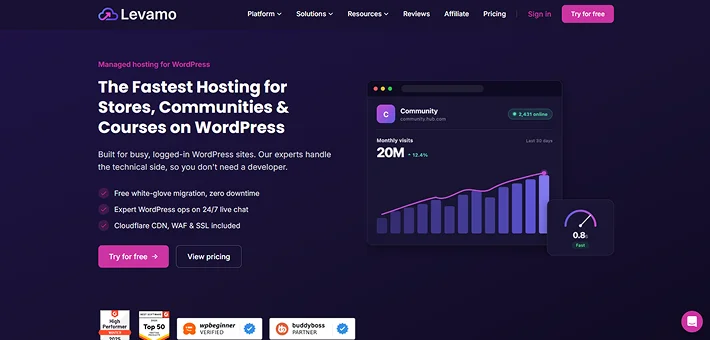
On Levamo, performance is not a single feature or a toggle you flip. It is a stack of six coordinated layers, each handling a different part of the workload. Here is what they do and why each one matters.
LiteSpeed Server Technology
Every Levamo site runs on LiteSpeed Server, a web server engineered for WordPress. Unlike Apache or standard Nginx, LiteSpeed includes built-in, server-level page caching and native HTTP/3 support. It handles high concurrency with significantly less overhead, which means your server can do more with the same resources.
For anonymous visitors, LiteSpeed’s integrated cache serves pages at the server level without a separate caching plugin. For logged-in users, it steps aside cleanly and lets the layers below do their work. No conflicts, no stale data.
KeyDB and Redis Object Caching
If you run a dynamic site, this is the single most impactful layer in the stack.
Object caching stores the results of database queries in your server’s memory. Instead of forcing WordPress to re-run the same expensive lookups on every page load, it pulls the answers from RAM.
A single WordPress page can generate anywhere from dozens to hundreds of database queries. Object caching eliminates a large share of those, and the difference is immediately noticeable on logged-in pages: dashboards load faster, cart updates feel snappier, and member profiles stop lagging.
Levamo runs KeyDB, a multithreaded fork of Redis. Classic Redis is fast but single-threaded, meaning it can only use one CPU core no matter how many you have. KeyDB removes that ceiling by distributing work across multiple cores, which translates to dramatically higher throughput under load.
During a live event or a flash sale, when hundreds of members are hitting the database simultaneously, that is exactly the condition where multithreaded caching earns its keep.
KeyDB speaks the full Redis protocol, so the Redis Object Cache plugin for WordPress works with it unchanged-no custom configuration, no risky re-architecting. Object caching is available on Business plans and above, tuned and managed for you.
High-Performance MariaDB
The database is where your content, users, orders, course progress, and community activity all live. Levamo’s MariaDB layer is tuned specifically for the query-heavy patterns dynamic WordPress sites generate: product search and filtering, member directories, activity feeds, course completion tracking, and order management.
A well-tuned database does not just respond faster. It stays stable as your user base and content library grow, handling more concurrent queries without degrading.
Auto-Scaling PHP Workers
Here is a scenario every store owner and community manager dreads: you launch a sale, announce a live event, or get featured in a newsletter. Traffic spikes. And your site crawls to a halt because there are not enough PHP workers to handle the requests.
Every logged-in visitor on a dynamic page needs a PHP worker. If workers are fixed at a set number, requests start queuing the moment demand exceeds capacity. Checkouts spin. Dashboards hang. Members leave.
On Levamo, PHP workers scale automatically. When traffic surges, additional workers come online without you lifting a finger. No advance predictions, no plan upgrades, no frantic support tickets. The platform absorbs the spike, and your site keeps responding.
Container Isolation
Every Levamo site environment runs in its own dedicated container with allocated CPU, RAM, and PHP workers. This is not a marketing term for shared hosting. Your resources are genuinely isolated. Another customer’s traffic spike or runaway plugin cannot touch your site’s performance.
This matters most during the moments that matter most: a sale, a course launch, a community event. When you need your hosting to hold up, it should not depend on what someone else’s site is doing.
In independent benchmarks, this stack produced a 9.3 WP Benchmark score, 2,958 database queries per second, and 353 requests per second under sustained load.
A 95% GTMetrix performance score rounds it out. Those numbers hold up because the stack is purpose-built for uncached, dynamic requests, not just static page delivery.
Enterprise Cloudflare CDN on Every Plan

Levamo includes Enterprise Cloudflare CDN on every plan: no add-on, no per-bandwidth fees, no gotcha pricing.
When you connect a domain through the Levamo dashboard, the Cloudflare stack activates automatically. No plugins to install, no proxy to configure. Here is what it delivers:
- 300+ global edge locations that serve content from the nearest point of presence to each visitor. Someone in Melbourne gets the same speed as someone in Virginia.
- Full-page edge caching for anonymous visitors. The majority of page views never reach your origin server, which reduces load and speeds up delivery worldwide.
- Static asset caching for images, CSS, JavaScript, and fonts, served from the edge on every request.
- A managed Web Application Firewall, DDoS mitigation, and auto-renewing SSL certificates, all included.
- HTTP/3 over QUIC for faster, more reliable connections at the edge.
If you already manage your own Cloudflare account, you can bring it. The “Bring Your Own Cloudflare” option lets you connect your existing zone and keep your settings without starting from scratch.
Together with LiteSpeed page caching and KeyDB object caching, this creates a three-layer caching architecture: server-level page cache at the origin, object cache for database queries, and edge cache for global delivery. Each layer covers a different part of the workload, and they coordinate without conflicting.
One note worth making: this is an integration powered by Cloudflare’s Enterprise CDN, managed through Levamo. You do not get a standalone Cloudflare Enterprise account. The key CDN controls (cache status, full-page caching, cache purging, development mode) are available directly in your Levamo dashboard.
Security Built Into the Infrastructure, Not Bolted On

A WordPress security plugin can only protect what it can see. The most effective defenses sit at the infrastructure layer, in front of WordPress, where threats can be stopped before a single line of plugin code runs.
- Cloudflare WAF and DDoS protection filter malicious traffic at the edge, across 300+ locations, before it reaches your server. Coverage includes the OWASP Top 10 (SQL injection, XSS, credential stuffing, brute-force attacks) plus bot mitigation. No per-attack surcharges.
- Container isolation ensures that a compromise on one environment cannot spread. Your code, database, and credentials are sealed behind process boundaries, network namespaces, and a hardened file system. Nothing is shared at runtime.
- Monarx-powered malware scanning uses behavioral analysis to catch threats by what they do, not just what they look like. This catches obfuscated payloads and zero-day variants that signature-based scanners miss. Malicious files are quarantined automatically. The team can assist with cleanup; complex remediation is handled per incident with scope, and costs are confirmed upfront.
- Advanced SiteShield (powered by Patchstack) is an optional add-on at $4 per site per month. It deploys virtual patches automatically the moment a plugin or theme vulnerability is publicly disclosed, closing the window between disclosure and official fix. You do not need to do anything.
- Free SSL and HTTPS on every site, auto-issued and auto-renewed via Cloudflare, with HTTP/3 at the edge.
If your site handles payments, stores member profiles, or manages student data, layered infrastructure security is not a luxury. It is a requirement.
Backups That Actually Protect Your Data
A backup from last night is cold comfort when you have lost a full day of orders, member activity, or course completions. Here is how Levamo handles it:
- Automated daily backups on every plan. Full site capture (database, files, plugins, themes, uploads) stored off-site, separate from your live container.
- Hourly backups available as an add-on at $10 per site per month. For stores and active communities, an hourly recovery point can mean the difference between a minor inconvenience and dozens of lost transactions. For context, Kinsta charges $100 per site per month for the same feature.
- On-demand snapshots so you can capture a restore point before a plugin update, theme change, or any other risky operation.
- One-click restore for the full site or individual files, straight from the dashboard. Every backup is logged with date, time, and file size.
- Per-site backup controls. You can toggle automatic backups on or off for any site. Staging environments and test sites do not need to generate copies you will never use, and a change on one site never affects the rest of your account.
Whether it is a botched update or something more serious, you are always one click from a known-good state. With hourly backups, that state is never more than sixty minutes old.
Migration: We Handle the Whole Thing, Free

Switching hosts is usually the reason people put up with a bad one for far too long. They dread the migration. Levamo removes that obstacle entirely.
The migration team handles the complete transfer:
- Full database (posts, pages, users, settings, custom tables)
- All plugins, themes, and custom code, verified for compatibility
- Complete media library (images, videos, uploads)
- DNS configuration guidance and SSL setup
- Pre-launch testing on a temporary URL before anything goes live
- Performance optimization on the way in, so your site arrives faster than it left
Most migrations complete within 48 business hours. Static sites and blogs typically see zero downtime. Stores and membership sites may need a brief maintenance window of about 15 minutes.
You do not need to be technical. You do not need to run a script. Whether you are coming from WP Engine, Cloudways, Kinsta, SiteGround, or anywhere else, you share your current host details, and the team takes it from there. The migration is free on every plan.
And if you want to test before committing: 3-day free trial, 24/7 live chat, and a 14-day money-back guarantee.
Support That Actually Solves Problems
Support runs 24/7/365, staffed by WordPress engineers (not first-tier agents reading from a script). First response on live chat is under a minute. Customer satisfaction sits at 4.6 out of 5 across nearly every topic category.
They read your error logs, diagnose your slow queries, untangle your plugin conflicts, and do the server-level work so you do not have to. If you do not have a developer on staff, that is the point. Levamo functions as your outsourced WordPress operations team.
For sites that need deeper coverage, optional Enhanced and Elite support tiers add priority response times, application-level troubleshooting inside WordPress, a dedicated account manager, and a private Slack channel.
When your checkout goes down at 2 AM or your community feed freezes during a live event, you need someone who can actually fix it. Not a knowledge base article.
A Dashboard Built for Owners and Developers Alike
Levamo’s dashboard is designed so a non-technical site owner can manage everything without touching a terminal, while giving developers full access when they want it.
For site owners and operators:
- Multi-site management from a single view
- One-click staging to test changes before pushing live
- Role-based access for teammates, clients, or contractors
- Built-in file manager for quick edits
- Real-time stats for traffic, bandwidth, and resource usage
- One-click plugin and theme updates with automatic rollback if something breaks
- PHP version switching without a support ticket
For developers and agencies:
- SSH and SFTP access
- WP-CLI for command-line WordPress management
- Git deployments for version-controlled workflows
- Linux cron for reliable scheduled tasks (replacing the unpredictable, traffic-dependent WP-Cron)
If you never want to use any of the developer tools, you never have to. That is what the support team and the managed platform are there for.
Who This Is Built For
Levamo is purpose-built for dynamic, logged-in WordPress workloads. If your site fits any of these descriptions, this is the infrastructure designed for you:
- Online stores running WooCommerce, Easy Digital Downloads, FluentCart, or similar platforms where slow checkout directly costs you revenue.
- Membership and community platforms with active, logged-in members generating constant database traffic through feeds, forums, messaging, and profiles.
- Agencies managing portfolios of client sites who need multi-site management, staging, and consistent infrastructure across accounts.
- High-traffic content sites with personalized or gated experiences that go beyond what page caching can serve.
These are the workloads where speed is directly tied to revenue. They are also the workloads that generic hosting handles the worst.
Plans and Pricing
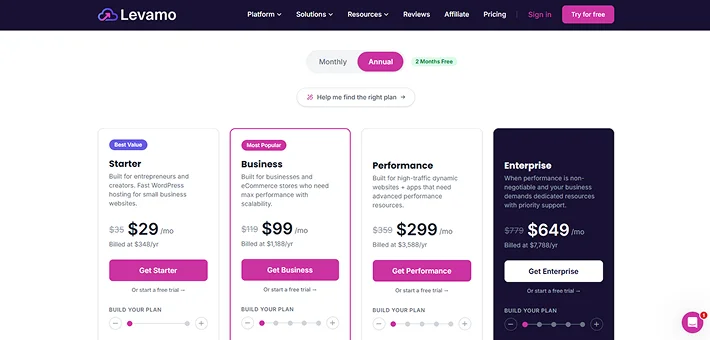
Every plan includes the full stack: LiteSpeed, Enterprise Cloudflare CDN, WAF and DDoS protection, Monarx malware scanning, free SSL, automated daily backups, free migration, one-click staging, and 24/7 expert support.
- Starter ($35/month or $348/yr): 1 site, 25K monthly visits, 10GB SSD. A solid entry point for a single site finding its footing.
- Business ($119/month or $1,188/yr): 3 sites, 75K visits, 25GB SSD. Adds KeyDB and Redis object caching plus 2x auto-scaling. This is the plan where most stores, communities, and course sites land.
- Performance ($359/month or $3,588/yr): 20 sites, 500K visits, 75GB SSD. Adds ElasticPress for fast product and content search. Built for agencies and high-traffic operations.
- Enterprise ($779/month or $7,788/yr): 30 sites, 1.8M visits, 200GB SSD. Adds a dedicated account manager and white-glove onboarding.
Additional sites on any plan cost approx. $20 each. Annual billing saves two months. Add-ons include Advanced SiteShield (approx. $4/month per site) for automated vulnerability patching and Hourly Backups (around $10/month per site) for tighter recovery points.
Every plan includes a 3-day free trial and a 14-day money-back guarantee. Data centers are available in the US East (Northern Virginia) and Europe (Dublin, Ireland). Levamo guarantees 99.99% uptime.
The Bottom Line
If your WordPress site logs people in, processes transactions, tracks progress, or runs a live community, it is doing the kind of work that page caching cannot help with. That work deserves infrastructure that was designed for it, not adapted from a setup meant for blogs.
Levamo stacks LiteSpeed Servers, KeyDB object caching, a tuned MariaDB database, auto-scaling PHP workers, full container isolation, and Enterprise Cloudflare CDN into a platform purpose-built for these workloads. It layers infrastructure-grade security on top, keeps backups tight enough to protect real transaction data, and puts a team of WordPress engineers on call around the clock so you do not need one on staff.
Your site does more than serve pages. Your hosting should too.
Start your free trial or view plans and pricing. When you are ready to move, our team migrates your site for free, with minimal downtime and full optimization on the way in.
Related Articles:
- 8 Best WordPress Membership Plugins in 2026 (Compared)
- The Impeccable List of Google Analytics Plugins for WordPress in 2026
- Top 10+ WooCommerce Extensions to Increase Conversions
Leave a Reply
You must be logged in to post a comment.