Best WordPress Automation Plugins in 2026: Tested and Compared
A lot of WordPress work is not hard. It is just repetitive.
Tell me one thing: how many times this week did you manually copy a form submission into your CRM, send a follow-up email, or update a spreadsheet row by row?
If the answer is “more than once,” you are losing hours you will never get back.
These are not strategic tasks; these are repetitive tasks that are wasting your valuable time. And the frustrating part is that it is happening every single day!
A good WordPress automation plugin can connect those steps and run them for you. It picks up every repetitive task and keeps your entire workflow working. From my experience, even a basic connection saves 5 to 10 hours every single week.
Here, I have tested and compared the best WordPress automation plugins in 2026. You will get honest breakdowns of features, pricing, and exactly which tool fits your workflow best.
What is a WordPress Automation Plugin
Let me explain this with a simple example. Suppose a new lead submits a form on your site. You open your CRM and add their details. Then, you switch to your email tool and send a welcome message. Then again, you realize they asked a question in the form, so you open another tab and type out a reply.
And you just did all of that for one person, just imagine how exhausting it can be when you have 20 form submissions in a single day!
What if the moment that form was submitted, everything just happened on its own? That’s what a WordPress automation plugin does. It connects the dots between your WordPress site and all the business tools you rely on, your CRM. your email platform, your spreadsheets, and even your team chat.
The moment something happens on your site, the plugin catches it and moves the right data to the right place instantly.
Why Automation Matters in 2026
In 2026, automation is no longer a nice feature. A study of Marketing Artificial Intelligence Institute says that, 98% of marketers have already integrated some form of AI into their daily operations. So Businesses are not just automating simple tasks. They are building intelligent workflows that think, decide, and act autonomously.
According to another interesting insight of McKinsey Global Institute estimates that automation could boost global productivity growth by 0.8-1.4% annually in the coming years. For a business handling hundreds of leads, orders, and customer interactions every month, even a 1% productivity gain leads to real hours saved, real money kept, and faster growth.
Best WordPress Automation plugin 2026 Comparison List – At a glance
Alright, for those of you who just want the quick answer, here you go. I put together a comparison table so you can see all five plugins side by side without having to read through everything first.
I recommend staying with me through the full breakdown. I am going to walk you through each plugin in full detail, covering features, pricing, and real use cases so that you can make perfect decisions.
| Plugin | Best For | Drag and Drop Builder | Unlimited Tasks | Price Starts From | Lifetime Deal Starts From |
| ARMember | Membership automation | Yes | Yes | $79/Year | No |
| Bit Flows | AI-Powered multi-step workflows | Yes | Yes | $59/year | $169 (Unlimited tasks) |
| AutomatorWP | Developer-friendly automation | No | Yes | $149/year | No |
| WP Fusion | CRM syncing | No | Yes | $297/year | $999 (Unlimited tasks) |
| WP Webhooks | Webhook based automation | No | Yes | $149/year | No |
| Ottokit | Cloud automation with WP Connector | Yes | No | $108/year | $499 (Tasks limited) |
Now that you’ve seen the quick comparison, let’s break down each WordPress automation plugin and see what makes them useful and valuable for users.
ARMember
Let’s start with ARMember – the best all-in-one WordPress membership automation plugin

ARMember is a membership and subscription management tool for WordPress. It automates user access and content control. You just have to create the membership plans and the system will automatically assign membership levels along with content access after a user signups or makes the payment.
The drip content scheduling works as a time-based automation which releases lessons, posts, or pages over a period of time automatically. It also lets you set delays based on signup date and creates a structured learning or onboarding flow.
Best of all, it sends automatic notifications to members via Email, SMS, and WhatsApp for each and every membership update. Integrating with 21+ payment gateways and dozens of email marketing tools, ARMember makes your membership site a true automation hub.
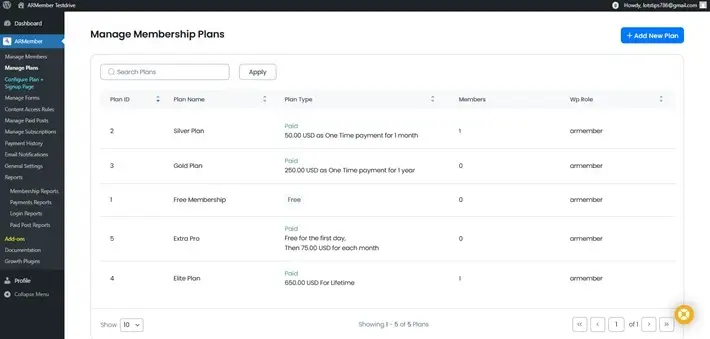
And it doesn’t stop here. ARMember automates your complete billing lifecycle including recurring payments, trial periods, upgrades/downgrades and automatic access revocation on failed payments. So, if you’re running a membership or subscription website, ARMember is the best WordPress membership management solution.
Bit Flows
Next is Bit Flows, one of the most advanced multi-step workflow automation tools for WordPress.
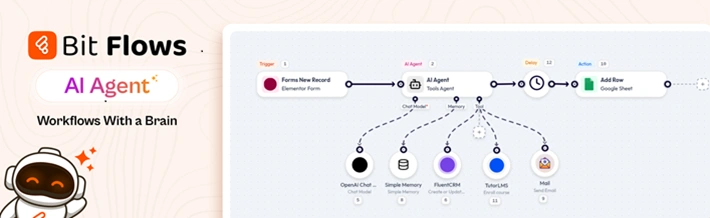
Most automation plugins present workflows as a vertical list of trigger → action steps, but Bit Flows takes a different approach. Its drag-and-drop canvas lets you build workflows visually, which I really found easy to use.
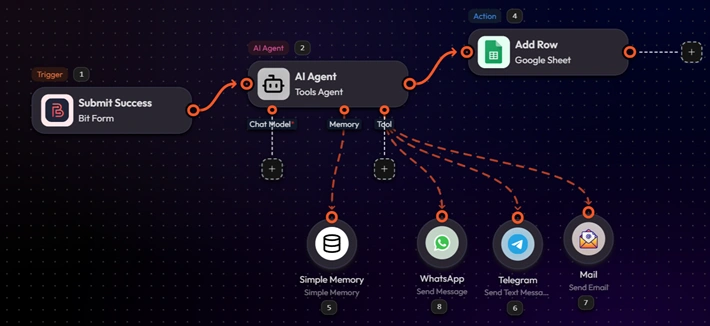
Bit Flows comes with powerful tools like routers, conditional logic, loops, delays, parsers, schedulers, and webhooks. These tools can help users to make the kind of workflow control you’d only find in dedicated platforms like Make or n8n.
Suppose you want to submit the order data on your website to a Google Sheet, from where, based on the information or message, a reply will be generated with the AI agent. After that it sent to the customer via email. So here is the flow I have created with this scenario.
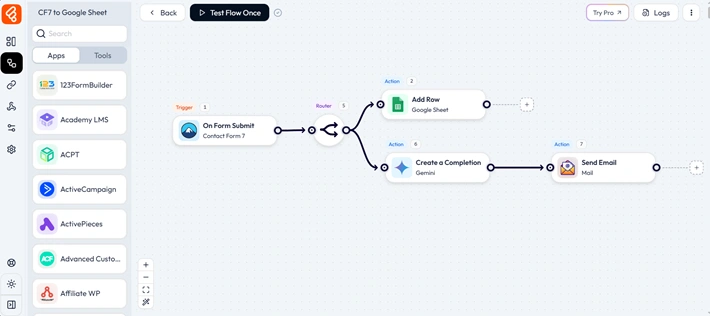
As it offers visual workflows, advanced automation, and built-in AI, I it’s a affordable solution. I’d recommend Bit Flows for marketers, eCommerce stores, agencies, SaaS builders, or anyone who wants to connect multiple tools and add a bit of intelligence to their workflows without any limits.
MailerHub – All-in-One Email Marketing, Automation & CRM for WordPress

MailerHub – A comprehensive WordPress email marketing and automation plugin that helps you grow your business with newsletters, automated campaigns, abandoned cart recovery, and built-in CRM. Create targeted email campaigns, build visual automation workflows, segment contacts, and recover lost sales directly from your WordPress dashboard. Fully self-hosted with no monthly SaaS fees, MailerHub gives you complete control over your customer data while delivering powerful email marketing automation for WooCommerce stores, membership sites, and online businesses.
AutomatorWP
Now let’s talk about AutomatorWP, one of the established automation plugins in the WordPress ecosystem.
AutomatorWP also works on a trigger → action system. You get access to over 200 integrations, including WooCommerce, LearnDash, Gravity Forms, Mailchimp, e.t.c.
The editor is more of a structured list. You can add your triggers and actions one by one. It is clean and easy to understand. If your workflow gets complex with multiple branches and conditions, that linear structure can feel limiting.
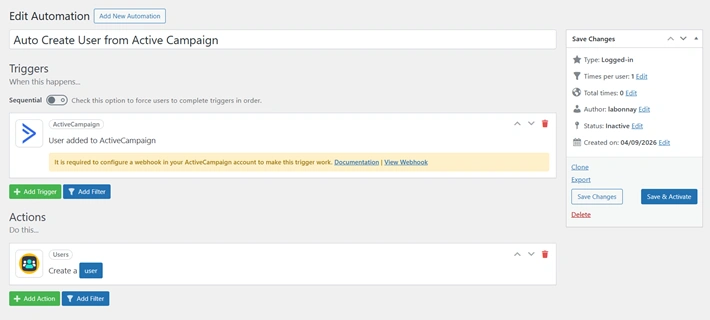
Let’s say, when a new contact is added to ActiveCampaign, it will automatically create a user account in your WordPress site. So here I have created the automation with AutomatorWP. You don’t need any coding knowledge to get started with Automator WP.
WP Fusion

Most automation plugins on this list try to do everything, but WP Fusion works differently. WP Fusion acts as a powerful connector between your WordPress site and your CRM. It lets you sync your WordPress users and data with your CRM and marketing automation systems.
You can then use this data to personalize the customer experience on your WordPress website. If your business depends heavily on CRM data, membership levels, or personalized content access, I think WP Fusion is a nice tool to have.
Although, there is no visual canvas or workflow builder. WP Fusion adds simple CRM controls inside your existing plugins. You can set which tags control access to content, and it handles everything automatically.
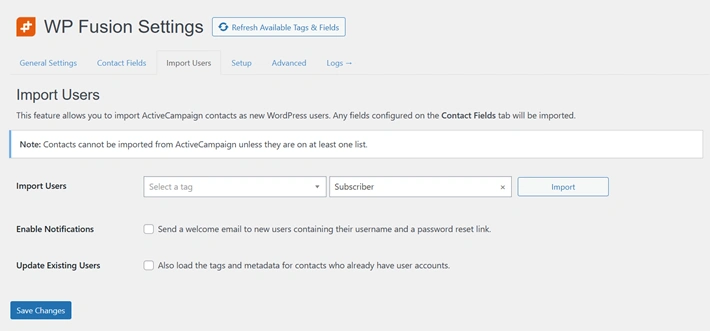
If you are still confused about how this works, let me give an example for you.
Suppose a student finishes a lesson in your LearnDash course. WP Fusion automatically adds a tag to that student in your CRM. That tag then triggers an email; it can be something like guiding them to the next module.
When the student comes back to your site, WP Fusion sees that update and unlocks the next lesson for them. Look at this to visualize how this works.
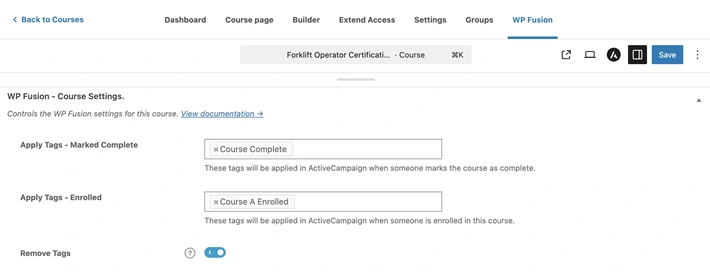
So, this is how you can then use this data to personalize the customer experience on your WordPress website. If your business depends heavily on CRM data, membership levels, or personalized content access, I think WP Fusion is a nice tool to have.
WP Webhooks
WP Webhooks is another automation plugin that can send data to your other software whenever anything happens on your site. As we know, webhooks are also one of the most common ways for making integrations directly from business software.
WP Webhooks works like a watchman sitting inside your WordPress site. It is organized around three core functions. Sending data out, receiving data in, and building flows. The interface is bit technical and those who are technical wordpress users, will definitely love this.
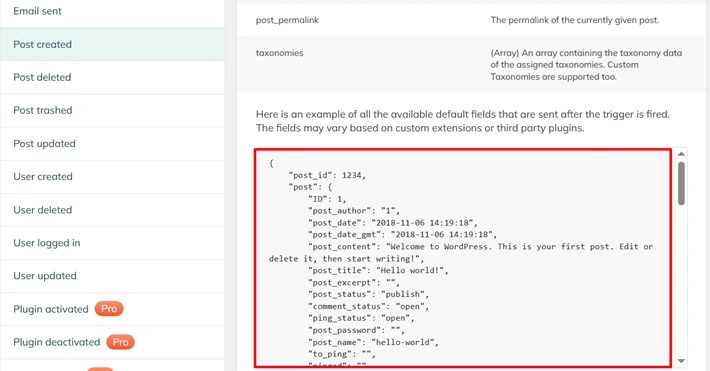
This is the WP Webhooks trigger panel, specifically showing the “Post Created” trigger in action. On the left, you have all the triggers, like Post Created, Post Deleted, User Logged In, and more. Basically, any important event that happens on your WordPress site.
The moment one of those triggers fires, WP Webhooks instantly sends all the related data, to whatever external tool you’ve connected. It just happens automatically in real time.
WP Webhooks is not trying to be an all-in-one automation platform. It’s more of a direct connection tool.
If you’re comfortable with webhooks and want a flexible, cost-effective way to connect WordPress with other systems, it’s a solid choice.
Ottokit / Suretriggers
OttoKit (previously known as SureTriggers) is a cloud-based automation platform, not a typical WordPress plugin that you have learned so far.
OttoKit has a user-friendly interface that makes it easy to create automations. Over 1,200 apps are supported. It works in a way like ,you create your workflows on their platform and connect your WordPress site using a plugin. From there, your site simply sends data, and OttoKit handles all the automation on its own servers.
That’s an important difference. You have seen that other plugins on this list, everything like form submissions, customer data, and order details are processed externally. For many businesses, that’s perfectly fine. But if you’re dealing with sensitive data or strict privacy needs, it’s something to keep in mind.
Another thing to consider is pricing. OttoKit works on a task-based model, so as your automation grows, your usage (and cost) increases over time.
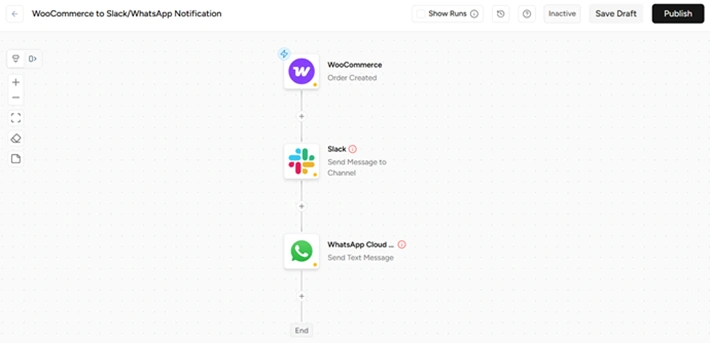
Think it like when a new WooCommerce order comes in, OttoKit automatically sends a message to your team’s Slack channel or personal WhatsApp the second a sale happens
How to Choose the Right Automation Plugin for WordPress
Now that you’ve seen all these plugins, the big question is which one should you actually pick?
Honestly, there’s no single “best” tool here. It really depends on how you work and what you need. But after testing all of these, here are a few things I’d personally look at before choosing one.
1. Start with how you like to build workflows
If you prefer seeing everything visually, a drag-and-drop builder makes a huge difference. Tools like Bit Flows or OttoKit feel much easier to manage because you can actually see how your automation is connected.
On the other hand, if you’re okay with a simple list-style setup, something like AutomatorWP will still get the job done, but it’s just less visual when things get complex.
2. Choose Ease Over Complexity
The testing of these tools revealed their strong capacity for performance yet their initial usage presents a challenge to users. If you need to invest excessive time to establish a simple workflow then the tool is not suitable for your needs.
The tool which you will find most useful to your work at all times exists beyond its available features.
3. Think about a pricing option in the long run
When it comes to pricing, this is something many people only realize after it’s too late. Some tools charge per task. Interestingly, it will look cheap at first, but costs increase fast as you build more workflows and add more steps.
When you automate, you’ll naturally explore and connect multiple apps ,so usage grows quickly. So it may not be wise to choose a task based payment option. I would recommend to see the full price range and consider if the lifetime deal available or not.
4. Make sure it works with your desired tools
Before you choose any WordPress automation plugin, take a minute to check if it actually connects with the tools you already use. This sounds obvious, but a lot of people skip this and regret it later.
Most of the plugins in this list do support so many tools, but remember that ,the quality of integration matters just as much as the number of integrations. Some tools just “connect,” but focus on which tools let you actually control data, triggers, and actions in a much deeper way.
5. Don’t ignore AI
In 2026, automation is not just about moving data from one place to another anymore. From what I’ve seen, the real value comes when your workflows can actually think a little.
Some of the WordPress automation tools are now adding AI powered option. And honestly, this is where everything is heading. Automation is slowly becoming more intelligent, not just faster.
So if you’re choosing a tool right now, I’d suggest going for something that already supports AI.
Final thoughts
Honestly, all of these plugins can genuinely help you automate your WordPress workflows. But the real difference is it’s how you like to work and how complex your setup needs to be.
If you want something simple and developer-friendly, AutomatorWP and WP Webhooks do the job well. If your focus is more on CRM-driven personalization, WP Fusion makes a lot of sense. And if you’re okay with a cloud-based setup and want access to a huge number of integrations, OttoKit is a solid option.
But from my experience testing all of these, one thing became pretty clear. If you’re looking for a balance between ease of use, flexibility, and AI features, Bit Flows stands out among all. What I really liked is how it gives you visual control, keeps complex logic manageable, and adds helpful AI features you start to appreciate over time.
That’s why I think it’s not about picking the “most powerful” tool. It’s about choosing the one that fits your workflow and actually saves your time.
FAQ
1. What is the best WordPress automation plugin in 2026?
Honestly, there is no single best option for everyone. It depends on your workflow. If you want visual multi-step automation inside WordPress, Bit Flows is a strong choice. If you want CRM-focused personalization, WP Fusion may fit better. If you want direct webhook control, WP Webhooks is a better match. The best move is to figure out what your workflow actually needs first, then pick accordingly.
2. What’s the difference between a WordPress automation plugin and Zapier?
Zapier routes your data through external servers. WordPress automation plugins work directly inside your site, giving you more control, better data privacy, and often a lower long-term cost.
3. Do WordPress automation plugins support AI in 2026?
Some do. Bit Flows is currently one of the few that has AI tools integrations, allowing your workflows to do more than just move data; they can actually process and respond intelligently.
4. Is there a free WordPress automation plugin worth using?
Yes. Some tools offer free versions or free plans that are good for testing simple automation before you move into advanced workflows.
5. Is task-based pricing worth it for automation tools?
The answer to this question is no because the solution becomes inefficient after its initial implementation. The initial costs appear inexpensive but actual expenses start increasing once users expand their operational processes through additional system integrations. Users who start using automation technology will develop a desire to enhance their capabilities. The natural progression follows this pattern. You need to check pricing systems for future growth before making any tool commitment because you should also look for available lifetime deals. The process will help you avoid future problems.
One response to “Best WordPress Automation Plugins in 2026: Tested and Compared”
Leave a Reply
You must be logged in to post a comment.
[…] Automated customer emails […]