ARPrice vs Easy Pricing Tables vs Go Pricing: Which Wins?
Are you looking for the best WordPress pricing table plugin? Luckily, your search ends here!
When it comes to the popular options, you must have come across multiple popular names like ARPrice, Easy Pricing Tables, and Go Pricing.
But which one is actually the best of them all?
Sure, ARPrice, Easy Pricing Table and Go Pricing are three of the most popular options. But they all are actually designed for very different users and purposes.
That’s why, today we’ll compare and put the best WordPress pricing table plugins head on head to find out which one of them is the perfect fit for your business.
Are you ready to dive in? Let’s go!
Quick Comparison: ARPrice vs Easy Pricing Tables vs Go Pricing
Short on time? No Worries! Check out this quick comparison of the best WordPress pricing table.
| Plugin | 🥇ARPrice | 🥈Easy Pricing Tables | 🥉Go Pricing |
| Best For | Advanced customization, stunning designs and all businesses who want a dynamic pricing table | Beginner friendly, Gutenberg users | Visual effects & animations |
| Starting Price | $27 (One-Time) | $49/Year | ~$29 (One-Time) |
| Free Version | ✅ Yes (Feature-rich) | ✅ Yes (Limited) | ❌ No |
| Templates | 300+ Premium Templates | 12 Free, 100+ Pro | 250+ |
| Integrations | PayPal, WooCommerce, ARForms and more | PayPal, Stripe, WooCommerce and more | None (No native support) |
| Standout Features | Live drag and drop editor, powerful analytics, pricing toggles, 900+ fonts, team showcase | Gutenberg block, Easy to use | 3D transitions, video embeds, icon sets |
| Ratings & Reviews | 4.4/5 Stars (210+ Review) | 4.2/5 Stars (132+ Review) | 4.4/5 Stars (804+ Review) |
ARPrice Plugin Review : Best Pricing Table Plugin
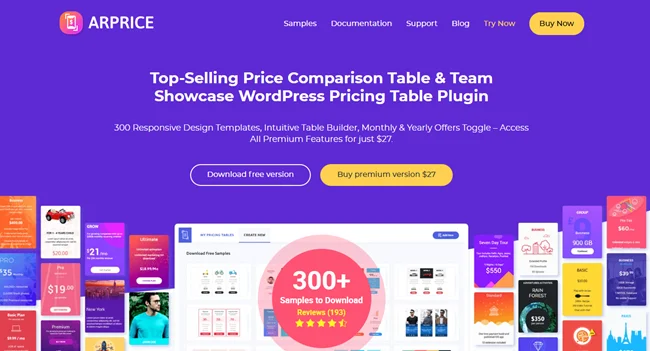
ARPrice is an all-in-one best pricing table plugin for WordPress. It comes with a user friendly interface and extensive set of customization options which makes designing a pricing table a breeze.
The best part? It is loaded with over 300+ pricing table samples to get your started right away. With its drag and drop interface, you can customize and design your pricing table to match your website’s style in real time.
key Features:
- Over 300+ pre designed pricing table templates
- Real time visual table editor
- Fully responsive designs
- Pricing plans Toggle
- Powerful built-in analytics
- Easy to import data from old templates
- Smoothly integrates with popular page builders
- Extensive customization with over 900 Google Fonts, CSS-based ribbons, unlimited colors, hover effects and more
- Integrates with powerful third party plugins such as PayPal, WooCommerce, ARForms and more
Pros:
- User friendly interface with real visual table editor
- Offers a wide range of templates and customization options
- Good documentation and support
- Smoothly connects with multiple powerful third party plugins
Cons:
- The free version has limited features compared to the extensive premium version
Best For: ARPrice is best for design conscious WordPress users, agencies, and businesses who want an powerful “all-in-one” plugin with advanced customization, rich media support and analytical tools to create highly visual and conversion-focused tables with no coding.
Easy Pricing Tables Review : Best for Beginners and Gutenberg Users
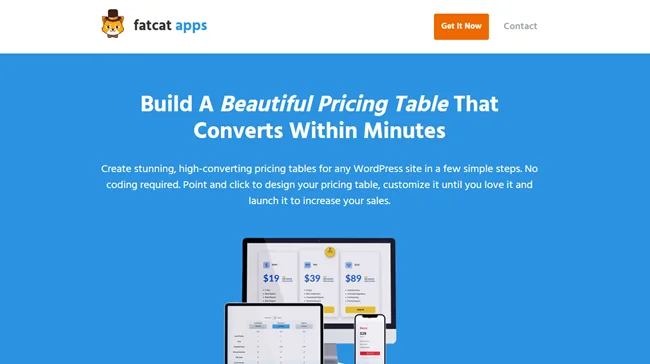
Looking for a pricing table plugin which is super easy to use? Easy Pricing Tables has got your back.
Easy Pricing Tables is another best WordPress pricing table plugin for beginners. It comes with a simple point and click interface so you need zero coding skills to create and customize your pricing table.
The best part? It is designed with Gutenberg block editor in mind. So you can directly design and edit your pricing table in blocks in the post editor.
Although ARPrice also smoothly connects with Gutenberg to create a variety of page designs and layouts, Easy Pricing Table tries to take that experience to the next level.
Features that makes it best among the best:
- Native Gutenberg integrations
- Simple and clean user interface
- Fully responsive designs
- Pricing Toggles
- Multiple customization options
- Smoothly integrates with payment gateways and eCommerce plugins
- Tracks performance with Google Analytics
Pros:
- Super easy to use for beginners and Gutenberg users
- Smoothly integrates with native Gutenberg block editor
- And easy to setup as well
Cons:
- Limited design templates in the free version (offers more in Premium)
- Fewer advanced customization options compared to ARPrice
Best For: Easy Pricing Tables is best for beginners and non tech-savvy WordPress users who want a simple, fast and native Gutenberg-integrated plugin to create conversion focused pricing tables without any coding.
Go Pricing Review: Best for Designers and Animated Layouts
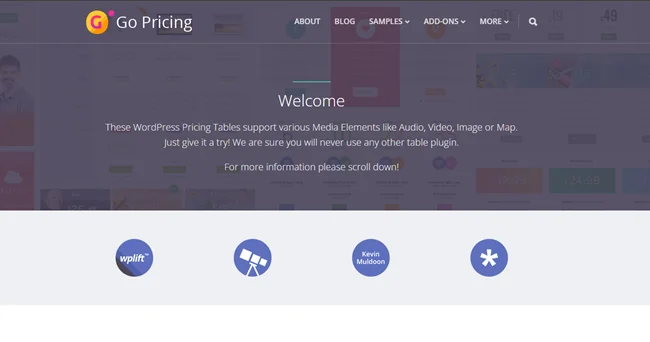
Go Pricing is one of the best WordPress pricing table plugins if you want full visual design flexibility. Best of all, this WordPress also supports multiple media elements such as audio, video, map and many more rich elements too..
Top Features:
- Over 250+ starter templates
- Rich media integration
- Multiple customization options
- Over 2000+ font icons and 650+ Google fonts
- Modern user friendly interface
- Column Animations
- Live Preview
Pros:
- Unmatched media support like video, audio, or maps for highly engaging tables
- Massive library of over 250 templates and 2000 icons
- and mind blowing animation and visual effects
Cons:
- The sheer number of options and settings might be overwhelming for new users and beginners
- While the admin UI is clean, the extensive feature set can lead to a steeper learning curve than simpler plugins
- This is a premium only plugin so no free version to try out
Best For: Go Pricing is best for designers and businesses with complex products or services who want unparalleled visual control, extensive customization, and the ability to embed rich media within their pricing tables to create truly unique and eye-catching WordPress pricing table comparison
ARPrice vs Go Pricing vs Easy Pricing : Feature by Feature Comparison
Want to compare ARPrice vs Go Pricing vs EasyPricing head on head? No problem!
Let’s compare the top best WordPress pricing plugins of 2025 and see who wins in this pricing table plugin comparison:
| Feature | ARPrice | Go Pricing | Easy Pricing Tables |
| Templates Available | 300+ Responsive Templates | 250+ Starter Templates | 12 Free, 100+ Pro Templates |
| Real-Time Visual Editor | ✅ Live drag-and-drop editor | ✅ Visual editor with live preview | ✅ Gutenberg block editor + live preview |
| Mobile Responsive | ✅ Auto-resizing for all devices | ✅ Optional responsive settings | ✅ 100% mobile-ready |
| Media Support | Images, Video, Audio embeds (YouTube, Vimeo), Maps | Images, Audio, Video, Maps | Images, Icons, Tooltips |
| Pricing Toggle | ✅ Multiple plan toggle (monthly/yearly up to 5) | ✅ Supported | ✅ Supported (toggle & featured column) |
| Built-in Analytics | ✅ Track views, clicks, performance | ❌ Not built-in | ✅ Google Analytics & Facebook Pixel |
| Payment Integration | PayPal, WooCommerce buttons | PayPal button shortcode | Stripe, PayPal, WooCommerce buttons |
| Page Builder Support | Elementor, Divi, WPBakery, Cornerstone, Beaver | Visual Composer | Gutenberg, Classic Editor, Elementor (shortcode) |
| Google Fonts Support | ✅ 900+ fonts | ✅ 650+ fonts | ✅ Custom fonts & styles |
| Animation Effects | ✅ 10+ effects for hover & transitions | ✅ 39+ column animations | ⚠️ Basic highlighting effects only |
| Team Showcase Support | ✅ Team member layouts included | ✅ Team Viewer layouts | ❌ Not supported |
| Import/Export Templates | ✅ Yes | ✅ Yes | ✅ Yes |
| Custom CSS | ✅ Full CSS guidance per column | ✅ Custom CSS allowed | ✅ Add your own CSS |
| Free Version | ✅ Available | ❌ Paid only | ✅ Limited free version |
Key Takeaways
ARPrice is the best of the best pricing table plugin for WordPress to create beautiful and dynamic pricing tables. Plus, it is loaded with a set of powerful customization options and 300+ templates to kickstart your project right now!
Go Pricing has the best media and animation features. Further, it is great for video rich and modern layout designs.
Easy Pricing Tables is the easiest option for Gutenberg based sites and users who want fast, simple and responsive pricing tables.
Which Plugin Offers the Best Value?
Want a pricing table WordPress which is worth it? We’ve got you!
Till now, we’ve introduced you to each of the best WordPress pricing table plugins and compared its features. From that, we can at least agree on one fact that ARPrice is taking the lead.
Whether it’s regarding key features, customization options or offering a free version, ARPrice is stealing the spotlight.
Yet, let’s see how long it can steal the spotlight when it comes to pricing and being money worthy.
ARPrice : Best Value for Money
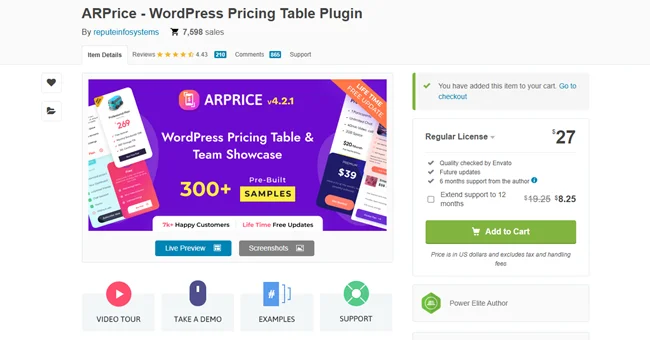
ARPrice offers a free version and only costs $27 for lifetime access with 6 months support.
In this, you get access to over 300+ pre-built templates, a real time visual editor, Gutenberg and major page builder support, powerful integrations and every single feature you can see, all in one package.
Why ARPrice worth it:
- One time payment only (no renewal fees)
- Includes analytics, toggles, team showcase, animations and all features
- Lifetime updates and premium support included
Plus, you can also extend the ARPrice premium support up to 12 months at just $8.25.
Easy Pricing Tables: Subscription Based Pricing
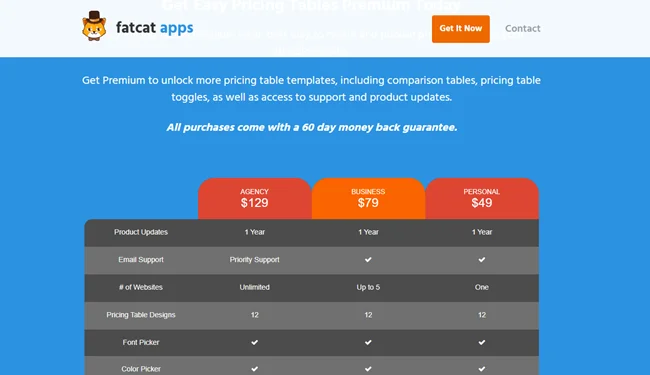
Easy Pricing Tables offers a free version for basic use in WordPress plugin directory. It offers three premium paid plans starting at $49 per year.
- Personal : $49/Year
- Business: $79/Year
- Agency: $129/Year
It’s the easiest to use especially if your site is built on Gutenberg but offers fewer customization options compared to ARPrice.
Why it’s worth it:
- Simple setup with Gutenberg integration
- Great for bloggers and small business owners
- Annual updates and email support included in the starting paid version
But here is a thing. If you want Pricing toggle Addon and WooCommerce Addon, then you must opt for higher paid plans starting at $79/year.
Go Pricing : Premium Only

Go Pricing costs $27 (Envato regular license) and while it’s the same as ARPrice in cost, it doesn’t offer a free version nor any kind of support.
Furthermore, this plugin is best for media integration, animations, and modern templates but lacks the analytics and advanced integrations found in ARPrice.
Why Go Pricing worth it:
- Amazing visual and animation options
- Good for designers and agencies who prioritize presentation
- One time purchase just like ARPrice
ARPrice vs Easy Pricing Tables vs Go Pricing – Which One Wins in 2025?
Let’s wrap this up the right way !
Why?
Because you’re not just looking for another WordPress plugin. You’re looking for the one that makes your pricing shine, fits your workflow and gives the biggest bang for your buck. So… which one is it?
- Do you want a plugin with stunning designs without coding?
- Do you need deep customization and analytics?
- Or are you simply hunting for the most affordable deal that delivers premium quality?
From all the features and pricing breakdown we have explored, I guess the answer is simple and straightforward:
ARPrice checks all the boxes: beautiful templates, drag and drop builder, payment buttons, analytics, toggles, and lifetime value at a one time price. Best of all, It comes with a simple user friendly interface and a set of extensive features that makes your pricing table creation super easy.
Yet Go Pricing wins the design flexibility game with rich media support and slick animations, but it can be overwhelming for beginners.
And, Easy Pricing Tables is perfect if you want something super simple, Gutenberg native, and fast to set up but it’s not nearly as feature packed as ARPrice.
So the Winner WordPress pricing table plugin for 2025?
You guessed it right! It’s none other than – ARPrice!
ARPrice offers the perfect blend of advanced features, stunning design tools, eye catching templates and expert support in an unbeatable pricing.Afterall, why settle for less when you can have a plugin that looks good, performs better, and grows side by side with your business.
So are you ready to make your prices shine with ARPrice? Get started with ARPrice and see your pricing table shine brighter than ever!
FAQs about WordPress Pricing Table Plugins
How do I add a pricing table in WordPress?
You can use a dedicated pricing table plugin for WordPress to add a pricing table in WordPress. Plugins like ARPrice, Easy pricing Table and Go Pricing makes creating and adding pricing tables in WordPress sites super easy.
How to create a pricing table in WordPress?
You can use a pricing table plugin like ARPrice or a page builder like Gutenberg to create a pricing table in WordPress. Furthermore, if you are a tech-savvy coder, you can also create a pricing table using HTML and CSS coding.
What is the easy pricing table?
Easy Pricing Table is one of the best WordPress pricing table plugins that allows users to create and design pricing tables for WordPress sites with no coding.
What is the best table plugin for WordPress?
ARPrice is the best table plugins for WordPress if you are planning to create a fully responsive and eye catching pricing table for your WordPress websites. It comes with over 300+ gorgeous looking pricing table templates and extensive customization options to create your pricing table with zero coding .
Leave a Reply
You must be logged in to post a comment.