
7 Best WooCommerce Reporting Plugins in 2026
WooCommerce stores are now playing a crucial role in driving the growth of online businesses worldwide. With this growth, store managers have no choice but to pay attention to the role of reporting for making data-driven decisions.
For small businesses, this approach is limited to basic sales summaries. However, big or multi-channel stores need to use a comprehensive solution to let them effectively analyse their sales performance and track customer behavior.
Data from multiple e-commerce surveys conducted between 2023 and 2025 indicates that store managers increasingly rely on reporting tools to identify fundamental problems in their stores. Reviewing custom sales reports helps them to have deep insights about checkout flows, promotion strategies, and fulfilment operations. So, they can take necessary action immediately if they recognize any issues.
The result of a survey conducted by iThemeland revealed that WooCommerce’s native reports are often considered insufficient for store managers, and they use an advanced reporting plugin to meet their requirements.
Here, we want to introduce several third-party plugins that are recommended by store managers to make creating sales reports and approaching Data-Driven Decisions more reliable.
What Are the Best Reporting Plugins for WordPress in 2026
According to the store managers, the best WooCommerce reporting plugins must have functional expectations that meet their real operational needs.
The most important feature is the ability to generate multi-dimensional sales reports. Managers insisted that they need sales data to be viewed alongside customer behavior, product performance, and order attributes. Single-metric dashboards are not satisfying or effective for them.
The other important feature is data ownership and accessibility. Managers prefer solutions that allow them to set permissions for their team and control operational tasks.
Another feature that is essential for stores with large historical datasets is using real time query for generating sales reports.
Finally, they preferred reporting tools with custom visualization to help them better understand the sales trends.
Based on these features, several reporting solutions are recommended by managers. Let’s get familiar with some of them.
1. Advanced WooCommerce Reporting by iThemeland
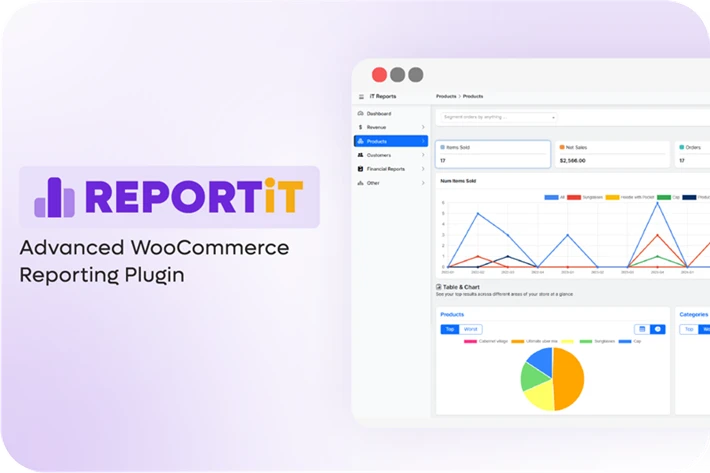
The REPORTiT plugin offers useful features providing structured access to WooCommerce data across multiple reporting dimensions.
Regarding the result of the survey, managers used this plugin to generate multiple sales performances with one click and analyze the result displayed in the visualize chart and table report to recognize product trends, customer activity, and tax data in parallel.
They were satisfied that server-side processing of the plugin enables them to handle larger datasets without excessive load on the administrative interface.
REPORTiT is also introduced as a solution for historical data comparisons. Users can generate reports across flexible time ranges to analyse seasonal behavior or campaign-related changes.
Extra features include:
- Easy-to-use interface.
- Advanced filtering options.
- Export data to CSV or PDF.
- Generate a forecast report.
- Schedule sending sales report to emails.
- Set permissions for user access.
- And more.
2. Ninjalytics (formerly Product Sales Report)
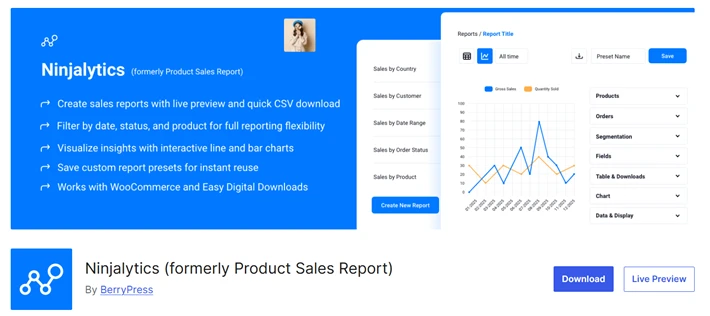
The Ninjalytics plugin is focused on retrospective analysis rather than real-time operational control. It is preferred by store managers looking for product-level and sales-level summaries that can be quickly reviewed or exported.
Sales or marketing teams that rely heavily on CSV outputs for further analysis in spreadsheet tools or accounting software find Ninjalytics a useful solution. With deeply interactive dashboards, it prioritizes clarity and speed in answering specific sales questions.
Managers are satisfied that generating periodic reporting workflows helps them to review monthly performance or evaluate seasonal campaigns.
The interface is structured around filtering and grouping data rather than continuous monitoring.
Extra features include:
- Sharing extracted data with external analysts or finance teams.
- Live preview and one-click download.
- Filter by date range, Order status, transaction data, and more.
- Product-specific or custom segmentation reporting.
- And more.
3. Metorik
As an external platform, Metorik integrates with WooCommerce through an API-based connection. It is frequently used by stores that require cross-channel visibility rather than isolated store metrics.
Metorik can aggregate WooCommerce data with customer behavior metrics, email campaign performance, and order lifecycle events.
It provides dynamic sales reports with timelines, customer cohorts, and performance trends that support ongoing exploration and segmentation.
Extra features include:
- Advanced Analytics & Reports.
- Customer Cohorts and Subscription Reporting.
- Product, Cost & Profit Reports.
- Superpower Segmenting.
- eCommerce Forecasting.
- Abandoned Cart Emails.
- Email Automation.
4. Metrilo

Metrilo is slightly different from other reporting tools. It combines analytics and customer intelligence, allowing store managers to track revenue with behavioral and lifecycle data.
The result of the survey shows that Metrilo is frequently implemented by subscription-based or repeat-purchase-oriented stores. Users can generate reports including customer retention metrics, cohort analysis, and lifetime value tracking.
It is a powerful solution for integrating email engagement, session behavior, and purchase frequency into its reporting model. This allows teams to evaluate not just what was sold, but how customer relationships evolve over time.
Store managers seeking a tool for strategic planning rather than daily operational reporting find Metrilo an ideal solution.
Extra features include:
- Monitor customer journey.
- Create specific segments to engage post-purchase based on behavior.
- Segment the customer base meaningfully and tailor the experience.
- Send effective data-driven emails.
- And more.
5. Conversios
The Conversios plugin is introduced as an optimization-focused reporting tool for store managers to generate insights related to conversion paths, checkout behavior, and funnel performance.
It allows managers to identify the purchasing process and conversion diagnostics by common indicators.
Managers often use Conversios alongside other reporting tools to get information for UX changes, A/B testing hypotheses, or checkout restructuring efforts.
Stores that prioritize experimentation and iterative optimization suggest Conversios as part of a broader analytics stack.
Extra features include:
- Server-side tracking (SST).
- Meta Conversions API (CAPI).
- Snapchat Conversions API (CAPI).
- Google Ads purchase conversion tracking.
- GA4 eCommerce and Ads reports.
- White-label PDF reports.
- Advanced event controls and custom mappings.
6. Google Analytics for WooCommerce
Google Analytics remains one of the most widely implemented analytics platforms in WooCommerce ecosystems. Its role, however, has evolved over time.
In 2026, Google Analytics is primarily observed as a traffic and behavior analysis tool rather than a comprehensive store reporting solution. Its strength lies in attribution modeling, user journey analysis, and campaign performance tracking.
WooCommerce integrations typically focus on syncing ecommerce events, transactions, and product impressions with Google’s reporting framework. This allows stores to analyze how users arrive at the site and interact with product pages before converting.
However, operational reporting such as order editing, fulfillment tracking, or internal performance metrics is usually handled outside Google Analytics. As a result, it is often paired with store-side reporting plugins.
7. Putler
Putler is commonly referenced in discussions about consolidated revenue reporting across platforms. It connects WooCommerce with payment gateways, subscription systems, and other sales channels to produce unified financial reports.
Observed use cases suggest that Putler is frequently adopted by stores operating multiple revenue streams, such as WooCommerce combined with SaaS billing or marketplace sales. Its reporting emphasizes cash flow, recurring revenue, and financial forecasting.
Rather than replacing store-level reporting tools, Putler is typically used at the executive or finance level to monitor overall business health.
Patterns Observed Across Reporting Tools
Across these platforms, several patterns emerge.
Tools operating inside WordPress tend to focus on operational visibility and direct data access, while external platforms emphasize aggregation and behavioral analysis. No single approach appears to fully replace the others.
The result of the survey indicates that many stores adopt multiple reporting tools simultaneously, each serving a distinct analytical purpose. This layered approach reflects the increasing complexity of e-commerce operations rather than tool redundancy.
Conclusion: Reporting as Infrastructure
The evolution of WooCommerce reporting tools suggests that analytics is no longer treated as an optional enhancement. Instead, it functions as infrastructure supporting pricing decisions, customer experience design, and operational efficiency.
As order volumes grow and sales channels diversify, reporting tools that align with a store’s operational model become increasingly relevant. Whether implemented inside WordPress or through external platforms, these tools collectively reflect a broader shift toward structured, data-informed commerce management.
In this context, the role of reporting plugins in WooCommerce is expected to continue expanding, not as marketing add-ons, but as foundational components of sustainable ecommerce operations.
You May Also Like:
- Top 7 WooCommerce Shipping Plugins for Smarter Delivery
- 5 WooCommerce Points and Rewards Plugins in 2026
- Best 10 WooCommerce Extensions to Increase Conversions
Leave a Reply
You must be logged in to post a comment.